Prodigy DSPy
The Prodigy DSPy plugin integrates the programmatic prompt engineering and optimization of the DSPy framework with Prodigy’s customizable annotation UI. It moves beyond manual prompt tweaking and introduces a structured and iterative workflow where both prompts and metrics are refined with human judgment.
At its core, this plugin is an “LLM-assisted LLM development” tool. It uses Prodigy’s UI to capture nuanced human intuition, which is passed directly to DSPy’s optimizers as structured feedback. Separately, an LLM synthesizes this feedback into actionable insights for developers — like identifying failure patterns or suggesting metric improvements.
Installation
To use the DSPy plugin, make sure you have Prodigy installed with the appropriate extras:
The Prodigy-DSPy Workflow
DSPy framework encourages an iterative cycle where human insights guide automated optimization. Instead of guessing how to fix your prompts, you follow a structured, data-driven process. Let’s trace the workflow for a summarization task as a working example:
-
Annotate: You start by creating a high-quality, gold-standard dataset. The
dspy.annotaterecipe uses a baseline DSPy program to generate “first-draft” predictions. In the Prodigy UI, you can then edit the summaries generated by the DSPy program to match your quality standards, quickly building the data needed for optimization. DSPy recommends minimally 30 and optimally 300 examples for the best results with the current optimizers. -
Evaluate & debug your metric: This is the core of the feedback loop. You define an initial metric (e.g., ROUGE score) and evaluate your program against your gold-standard data. You might find out that a simple score can be misleading. A summary might get a high ROUGE score by repeating phrases from the original text, while completely missing the main conclusion. The
dspy.evaluaterecipe launches an interactive UI where a human can flag these discrepancies, e.g: “The metric score is 0.9, but this summary is bad because it omits the key finding.” This is where you capture the failure modes of both your DSPy program and your DSPy metric. The human feedback collected in this step is saved to your dataset under thehuman_feedbackfield.
-
Synthesize insights (for guidance): The
dspy.feedbackrecipe takes the dataset of human corrections and comments from the evaluation step and uses an LLM to synthesize it. It analyzes the examples where your metric and human judgment disagreed and produces concrete, actionable insights for your review, such as:- Improvement hints: A global, concise instruction for the developer to avoid common errors observed across examples. This could be helpful to improve annotators’ instructions and guidelines as well as reveal patterns in the data that might require special handling.
- Metric suggestions: Hints on how to improve your Python metric function to better reflect human preferences, potentially including new Python code.
-
Optimize: Finally, you feed your training data (now containing human feedback) and your improved metric into a DSPy optimizer using
dspy.optimize. The optimizer “compiles” your summarization program, automatically tuning its prompts to generate summaries that are more aligned with what humans considers important. The output is a new, optimized program, ready for the next round of evaluation.
This cycle empowers you to build systems that learn from the subtle, nuanced judgement that only a human can provide, creating a feedback loop between human intuition and automated optimization provided by DSPy.
Configuration & Extensibility
The entire plugin is driven by a flexible, modular architecture supported by confection configuration system. The Prodigy recipes ( dspy.annotate, dspy.evaluate, etc.) are generic runners; they orchestrate the workflow but contain no task-specific logic themselves (except for Prodigy built-in tasks where the data structure flow is known and we could provide dedicated recipes e.g. dspy.ner.annotate). All the task specific logic — the program, the data conversion, the UI—lives in Python components that you provide.
This makes the plugin fully extensible. To adapt the workflow to your custom task, you need to implement a set of Python components and register them with Prodigy’s registry. The recipes then discover and run your components based on the configuration file.
The Core Components
1. The DSPy Program
- Role: Defines the core logic of the language model task. It consists of a Signature (inputs/outputs) and a Module (how to execute it). See DSPy docs for more details.
- Used by:
dspy.annotate,dspy.evaluate,dspy.feedback,dspy.optimize.
To make it available to Prodigy, you write a factory function that returns an instance of your program and decorate it with @registry.dspy_programs.register("your_program_name.v1").
# Example DSPy program for summarization task
import dspyfrom prodigy.util import registryfrom prodigy_dspy.utils.dspy_loaders import load_program_statefrom typing import Optional

class Summarize(dspy.Signature):    """Summarize the given document."""
    document: str = dspy.InputField(desc="The document to summarize.")    summary: str = dspy.OutputField(desc="A concise summary of the document.")

class SummarizationProgram(dspy.Module):    """A simple program that uses a chain-of-thought prompt to summarize a document."""
    def __init__(self):        self.generate_summary = dspy.ChainOfThought(Summarize)
    def forward(self, document: str):        return self.generate_summary(document=document)

# Factory function to register the program with Prodigy@registry.dspy_programs.register("summarization.v1")def make_summarization_program(load_path: Optional[str] = None): """A simple program that uses a chain-of-thought prompt to summarize a document.""" program = SummarizationProgram() if load_path is not None: return load_program_state(program, load_path) return program2. Data Converters
- Role: Transform data between different formats throughout the workflow. The plugin uses the
dspy_convertersregistry for all data transformations. - Types of converters:
- to_prodigy converter: Translates DSPy predictions to Prodigy format (to display in UI)
- to_dspy converter: Translates Prodigy data to DSPy Example (shared across recipes)
- Recipe-specific converters (optional): Override shared converter for specific recipes
# Example converters for summarization taskimport jsonfrom typing import Dictimport dspyfrom prodigy.util import registry

# to_prodigy Converter: DSPy Prediction -> Prodigy Task# Converts DSPy predictions into Prodigy UI format for annotation.@registry.dspy_converters.register("dspy_to_prodigy.summary.v1")def make_dspy_to_prodigy_converter():    """Adds model predictions to Prodigy tasks for annotation."""    def add_summary_to_task(task: Dict, prediction: dspy.Prediction) -> Dict:        # Store raw prediction for reference        task["pred_summary"] = prediction.summary        # Pre-fill gold_summary field for editing (users create gold standard)        task["gold_summary"] = prediction.summary        if hasattr(prediction, "reasoning"):            task["reasoning"] = prediction.reasoning        return task    return add_summary_to_task

# to_dspy Converter: Prodigy Task -> DSPy Example@registry.dspy_converters.register("prodigy_to_dspy.summary.v1")def make_prodigy_to_dspy_converter():    """Converts Prodigy data to DSPy Examples."""    def prodigy_to_dspy_summary(eg: Dict) -> dspy.Example:        # Handle both raw source data and annotated data        # Raw source might have "text", annotated data has "text" and "gold_summary"        document = eg.get("text", eg.get("document", ""))        summary = eg.get("gold_summary", "")
        example = dspy.Example(            document=document,            summary=summary        )
        # Attach human feedback if present (from evaluation step)        if "human_feedback" in eg and eg["human_feedback"]:            feedback_str = json.dumps(eg["human_feedback"], indent=2)            example = example.copy(feedback=feedback_str)        return example.with_inputs("document")    return prodigy_to_dspy_summary
3. The Metric Function
- Role: Takes a gold-standard example and a prediction and returns a score (
float,intorbool). See DSPy docs on metrics for more details. - Used by:
dspy.evaluate,dspy.optimize.
For subjective tasks like summarization, using an LLM as a judge is a powerful technique and it’s fairly easy to implement it with DSPy! In the example below we use a dedicated DSPy program to evaluate the predictions.
# Example metric for summarization task

class AssessSummary(dspy.Signature):    """Assess the quality of a generated summary against a gold-standard summary."""
    gold_summary: str = dspy.InputField(desc="The reference summary.")    predicted_summary: str = dspy.InputField(desc="The summary generated by the model.")    # Hint!  You can enforce the format via Pydantic model as type    assessment: str = dspy.OutputField(        desc="A single-word assessment: 'Good', 'Okay', or 'Bad'."    )

def llm_based_summary_metric(    gold: dspy.Example, pred: dspy.Prediction, trace=None) -> float:    """Uses an LLM to grade the summary quality on a scale from 0.0 to 1.0."""    assessor = dspy.Predict(AssessSummary)    result = assessor(gold_summary=gold.summary, predicted_summary=pred.summary)    score_map = {"good": 1.0, "okay": 0.5, "bad": 0.0}    assessment_word = result.assessment.split()[-1].strip(".").lower()    return score_map.get(assessment_word, 0.0)

 @registry.dspy_metrics.register("summary_metric.v1")def make_summary_metric():    return llm_based_summary_metric
4. The Task Evaluator
- Role: A class that defines the data transformations for the metric-debugging workflow. It inherits from
BaseTaskEvaluator. - Used by:
dspy.evaluateif the--debug-metricflag is used.
This component defines how the evaluation results should be transformed into Prodigy tasks (get_stream method) and how they should be stored in the database (get_before_db_callback method).
The BaseTaskEvaluator defines a default run method that invokes dspy.Evaluate module but it can be overwritten if needed. The program and metric are injected by the recipe via set_program() and set_metric() methods, so your factory function only needs to handle task-specific configuration parameters.
Show BaseTaskEvaluator
class BaseTaskEvaluator(ABC):    """    Base class for task-specific evaluation logic.    It handles the common evaluation loop and summary printing.
    The program and metric are injected by the recipe via set_program/set_metric.    """
    def __init__(        self,        num_threads: Optional[int] = None,        **kwargs,    ):        self.program: Optional[dspy.Module] = None        self.metric: Optional[Callable] = None        self.num_threads = num_threads        log(f"EVALUATOR: Initialized {self.__class__.__name__}.")
    def set_program(self, program: dspy.Module) -> "BaseTaskEvaluator":        """Set the DSPy program to evaluate. Called by recipe."""        self.program = program        return self
    def set_metric(self, metric: Callable) -> "BaseTaskEvaluator":        """Set the metric function. Called by recipe."""        self.metric = metric        return self
    def run(        self, devset: List[dspy.Example]    ) -> dspy.evaluate.evaluate.EvaluationResult:        """        Default implementation of the evaluation loop.        It runs the program, applies the metric, and yields a standardized        result dictionary for each example.        """        evaluator = dspy.Evaluate(            devset=devset,            metric=self.metric,            display_progress=True,            num_threads=self.num_threads,        )        result = evaluator(self.program)        return result
    def print_summary(self, results: dspy.evaluate.evaluate.EvaluationResult):        """        Default summary printer. It calculates and prints the average score.        Subclasses can override this for more detailed statistics.        """        if not hasattr(results, "score") or not hasattr(results, "results"):            raise ValueError(                "EvaluationResult missing required 'score' or 'results' attributes"            )
        score = results.score        all_results = results.results  # List of (example, prediction, score)
        if all_results is None:            raise ValueError("Evaluation results is None - evaluation may have failed")
        if len(all_results) == 0:            msg.info("No results to summarize.")            return
        msg.divider("Evaluation Summary")        data = [            ("Total Examples", str(len(all_results))),            ("Average Score", f"{score:.3f}"),        ]        msg.table(data, header=("Metric", "Value"), divider=True)
    @abstractmethod    def get_stream(        self, results: dspy.evaluate.evaluate.EvaluationResult    ) -> StreamType:        """        **This is the main method subclasses must implement.**        It converts the EvaluationResult from `run()` into Prodigy-compatible tasks.        """        raise NotImplementedError(            "Subclasses must implement get_stream to map run results to a Prodigy task."        )
    def get_before_db_callback(self) -> Optional[Callable]:        """Returns Prodigy `before_db` callback."""        return None
# Example task evaluator for summarization taskfrom prodigy_dspy.evaluators import BaseTaskEvaluator
class SummarizationTaskEvaluator(BaseTaskEvaluator): """Defines the stream for metric debugging and feedback collection."""
def get_stream( self, results: dspy.evaluate.evaluate.EvaluationResult ) -> StreamType: """Maps the evaluation result to a Prodigy task stream.""" all_results = results.results for example, prediction, score in all_results: yield { "document": example.document, "summary_gold": example.gold_summary, "summary_from_model": prediction.summary, "metric_score": score, }
def get_before_db_callback(self): "Structure feedback data before saving to the DB" def before_db_callback(examples): for eg in examples: # Add human_feedback field for feedback synthesis eg["human_feedback"] = { "quality": eg.pop("quality_choice", None), "comment": eg.pop("user_comment", None), } # Add metric_score for feedback synthesis # (already present from get_stream, but ensure it's there) eg["metric_score"] = eg.get("metric_score", 0.0) return examples return before_db_callback
# Factory function@registry.dspy_evaluators.register("summarization_evaluator.v1")def make_summary_evaluator( num_threads: Optional[int] = None) -> SummarizationTaskEvaluator: return SummarizationTaskEvaluator(num_threads=num_threads)5. UI Configuration
- Role: Defines the Prodigy UI for annotation and evaluation.
- Used by:
dspy.annotate,dspy.evaluate.
The Prodigy UI configuration should also be specified in the configuration file using two dedicated sections: [dspy_annotation_ui] for the annotation recipe and [dspy_evaluation_ui] for the evaluation recipe. Both sections reference factory functions that generate Prodigy UI configuration dictionaries.
# Example UI configuration for annotation @registry.dspy_ui.register("my_annotation_ui.v1")def make_my_annotation_ui():    return {        "view_id": "blocks",        "blocks": [            {"view_id": "text_input", "field_id": "summary", "field_label": "Summary"},        ],    }
# Example UI configuration for evaluation @registry.dspy_ui.register("my_evaluation_ui.v1")def make_my_evaluation_ui():    return {        "view_id": "blocks",        "blocks": [            {"view_id": "html", "html_template": "<h3>Evaluation Feedback</h3>"},        ],    }
# In your .cfg file:
[dspy_annotation_ui] @dspy_ui = "my_annotation_ui.v1"
[dspy_evaluation_ui] @dspy_ui = "my_evaluation_ui.v1"Putting it all Together: The Config File
Once your components are defined and registered in a Python file, you tie them all together in your confection .cfg file. This single file contains all the configuration for your project: it defines the LLM settings, optimizer parameters, and points to all the custom components the recipes will use.
The recipes use this config to load the correct components for each step so it should be passed as a positional argument, while the component definition .pyshould be passed using Prodigy -F argument.
A complete config file for our summarization task would look like this:
# Example config for summarization task

# 1. DSPy Language Model Configuration[dspy][dspy.lm]model = "openai/gpt-4o-mini"# Optional: Any other keyword arguments for the dspy.LM factory,# like 'max_tokens' or 'temperature'.max_tokens = 1500# Optional: Specify a custom environment variable name for the API key.# The plugin will read the API key from this environment variable.# If omitted, DSPy uses its default (e.g., OPENAI_API_KEY).env_api_key = "PERSONAL_OPENAI_API_KEY"
# 2. Optimizer Configuration[optimizer]# The DSPy optimizer class to use for dspy.optimizeclass = "GEPA" # The DSPy optimizer class to useauto = "light"[optimizer.reflection_lm]model = "openai/gpt-4o-mini"temperature = 1.0max_tokens = 1500
# 3. Your Custom Components[program] @dspy_programs = "summarization.v1"
[to_prodigy_converter] @dspy_converters = "dspy_to_prodigy.summary.v1"
# Simple approach: Shared converter for all recipes[to_dspy_converter] @dspy_converters = "prodigy_to_dspy.summary.v1"
# Optional: Recipe-specific converters (override shared converter)# [optimize_to_dspy_converter]# @dspy_converters = "optimize_to_dspy.summary.v1"
[metric] @dspy_metrics = "summary_metric.v1"
[evaluator] @dspy_evaluators = "summarization_evaluator.v1"# Optional: Control parallel evaluation threadsnum_threads = 4
[dspy_annotation_ui] @dspy_ui = "my_annotation_ui.v1"
[dspy_evaluation_ui] @dspy_ui = "my_evaluation_ui.v1"
To get started on your own task, you can use the template below. Save it as my_components.py, fill in the logic, and then create a .cfg file that points to the names you register.
Show components_template.py
# my_components.pyimport dspyfrom prodigy.util import registryfrom prodigy_dspy.evaluators import BaseTaskEvaluatorfrom prodigy_dspy.utils.dspy_loaders import load_program_statefrom typing import List, Dict, Any, Callable, Iterator, Optionalimport json

# 1. DSPy Programclass YourSignature(dspy.Signature):    """Describe your task here."""
    # Define your input and output fields    # Use type hints or Pydantic models to enforce the correct data structure in the LLM's output    input_field: str = dspy.InputField()    output_field: int = dspy.OutputField()

class YourProgram(dspy.Module):    """Implement your DSPy program logic."""
    def __init__(self):        super().__init__()        # Your dspy.Module e.g dspy.Predict or dspy.ChainOfThought modules        self.predictor = dspy.Predict(YourSignature)
    def forward(self, **kwargs):        # Your forward pass logic        return self.predictor(**kwargs)

@registry.dspy_programs.register("my_program.v1")def make_my_program(load_path: Optional[str] = None):    """Describe what your program does here. This is used by dspy.feedback for context."""    program = YourProgram()    return load_program_state(program, load_path)

# 2. Data Converters# All converters use the dspy_converters registry
# to_prodigy: DSPy Prediction -> Prodigy UI@registry.dspy_converters.register("dspy_to_prodigy.my_task.v1")def make_dspy_to_prodigy_converter():    def dspy_to_prodigy(task: Dict, pred: dspy.Prediction) -> Dict:        """Add model prediction to Prodigy task for annotation."""        # ... your implementation here ...        return task    return dspy_to_prodigy

# to_dspy: Prodigy -> DSPy Example@registry.dspy_converters.register("prodigy_to_dspy.my_task.v1")def make_prodigy_to_dspy_converter():    def prodigy_to_dspy(eg: Dict) -> dspy.Example:        """Convert Prodigy data to dspy.Example."""        # Handle both raw source and annotated data        input_field = eg.get("input_field", eg.get("raw_input", ""))        output_field = eg.get("gold_output", "")
        example = dspy.Example(            input_field=input_field,            output_field=output_field        )
        # Attach human feedback if present (from evaluation)        if "human_feedback" in eg and eg["human_feedback"]:            feedback_str = json.dumps(eg["human_feedback"], indent=2)            example = example.copy(feedback=feedback_str)        return example.with_inputs("input_field")    return prodigy_to_dspy

# 3. Metric Function @registry.dspy_metrics.register("my_metric.v1")def make_my_metric():    def my_metric(gold: dspy.Example, pred: dspy.Prediction, trace=None) -> float:        """Calculate the score for a prediction."""        # ... your implementation here ...        # Return a score between 0.0 and 1.0        return 1.0 if gold.output_field == pred.output_field else 0.0
    return my_metric

# 4. Task Evaluatorclass YourTaskEvaluator(BaseTaskEvaluator):    """Define the stream for metric debugging."""
    def get_stream(        self,        results: dspy.evaluate.evaluate.EvaluationResult    ) -> Iterator[Dict]:        """Yield examples for the metric debugging UI."""        # ... your implementation here ...        # EvaluationResult object has two attributes        # - score (float) - overall performance        # - results (list) - a list of (example, prediction, score) tuples for each example in devset        for ex, pred, score in results.results:            yield {"text": ex.input_field, "score": score}
# Factory function - only takes config parameters# program and metric are injected by the recipe@registry.dspy_evaluators.register("my_evaluator.v1")def make_my_evaluator(    num_threads: Optional[int] = None) -> YourTaskEvaluator:    return YourTaskEvaluator(num_threads=num_threads)
# 6. UI Factoriesdef annotation_ui() -> Dict:    """Returns a dictionary for a Prodigy "blocks" UI for annotation."""    # ... your implementation here ...
 @registry.dspy_ui.register("my_annotation_ui.v1")def make_my_annotation_ui():    return annotation_ui
def evaluation_ui() -> Dict:    """Returns a dictionary for a Prodigy "blocks" UI for evaluation."""    # ... your implementation here ...
 @registry.dspy_ui.register("my_evaluation_ui.v1")def make_my_evaluation_ui():    return evaluation_ui
End-to-End Example: Summarization
For an end-to-end example of applying Prodigy-DSPy workflow on real life summarization task please check our blog post and the code.
How Human Feedback Integrates with DSPy Optimization
The power of this workflow lies in how human judgment, captured as human_feedback by Prodigy UI, is directly integrated into the DSPy optimization loop.
- Collection in
dspy.evaluate: During the evaluation phase, when you provide qualitative feedback (e.g., comments, error classifications), this information is saved as a structured object under thehuman_feedbackfield within your Prodigy examples. - Propagation via
to_dspy_converter: When you rundspy.optimize, yourto_dspy_converterreads these Prodigy examples. It specifically looks for thehuman_feedbackfield. It then stringifies this structured data (e.g., usingjson.dumpsto convert it into a JSON string) and assigns it to the standardfeedbackattribute of thedspy.Exampleobject. - Integration with the metric: Your custom metric function, when wrapped by
create_feedback_metricin thedspy.optimizerecipe, returns adspy.Predictionobject. This object now includes thefeedbackattribute, containing your stringified human judgment. - Leveraging DSPy reflection engine: Optimizers such as
GEPAare designed to utilize thisfeedbackattribute. GEPA operates through a multi-step reflective process. It captures full execution traces of DSPy modules, identifies the portions corresponding to specific predictors requiring optimization, and uses a dedicated language model (reflection_lm) to reflect on the predictor’s behavior.
This direct integration ensures that your human insights actively guide the automated optimization process, leading to more aligned and effective DSPy programs.
Using Pre-configured Tasks
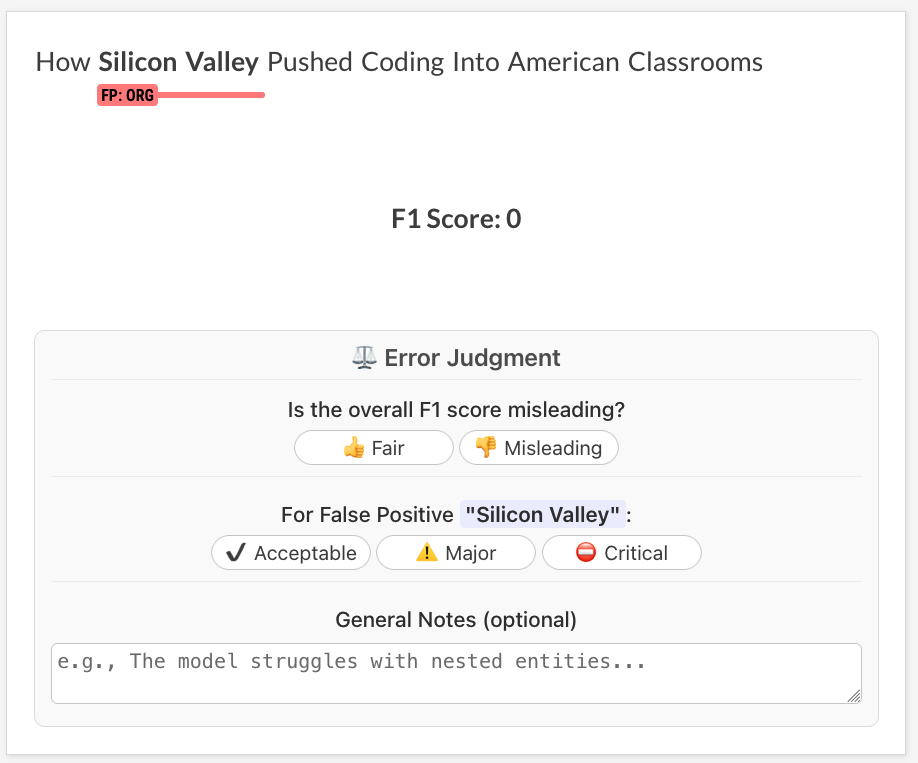
While you can configure any task from scratch, the plugin provides pre-packaged settings for common tasks such as Named Entity Recognition (NER). To use it, you don’t need to implement any components or provide a full config file. Simply provide your DSPy settings and optimizer sections and use the --task ner flag with dspy.evaluate, dspy.feedback and dspy.optimize. For the annotation stage we created a dedicated dspy.ner.annotate to leverage additional CLI settings for ner.manual. The recipe will automatically load the correct program, metric, and evaluator for NER.
API Reference
dspy.ner.annotate manual
Correct DSPy NER annotations and inspect the reasoning.
| Argument | Type | Description |
|---|---|---|
dataset | str | The Prodigy dataset to save annotations to. |
nlp | str | Loadable spaCy pipeline for tokenization or blank:lang. |
source | str | The path to the source data file (e.g., ./data.jsonl). |
config | str | Path to a .cfg config file defining the [dspy] settings. |
--load-from, -L | Path | Optional path to a saved .json DSPy program file to load. |
--label, -l | str | Comma-separated labels to annotate. |
--loader, -lo | str | Optional loader for the source file (e.g., jsonl). |
--exclude, -e | str | Comma-separated dataset IDs whose annotations to exclude. |
--highlight-chars, -C | bool | Allow highlighting individual characters instead of tokens. |
--edit-text, -E | bool | Allow editing the text during annotation. |
dspy.annotate manual
Correct data annotated with a DSPy program.
| Argument | Type | Description |
|---|---|---|
dataset | str | The Prodigy dataset to save annotations to. |
source | str | The path to the source data file (e.g., ./data.jsonl). |
config | str | Path to a .cfg file defining program, converters, and annotation UI. |
--load-from, -L | Path | Optional path to a saved .json DSPy program file to load. |
--loader, -lo | str | Optional loader for the source file (e.g., jsonl). |
--label, -l | str | Comma-separated labels for the task. Overrides labels in config. |
dspy.evaluate manual
Evaluates a DSPy program against a gold-standard dataset. It prints a quantitative summary and can launch an interactive UI for collecting granular, qualitative feedback. The human feedback collected should be saved to the dataset under the human_feedback field using before_db callback.
| Argument | Type | Description |
|---|---|---|
dataset | str | Name of the Prodigy dataset to save feedback annotations to. |
source | str | Name of the source Prodigy dataset with gold-standard data. |
config | Path | Path to a .cfg file with [dspy], [metric], [evaluator], and [dspy_evaluation_ui] settings. |
--task, -T | str | Optional name of a built-in task (e.g., ner) to load its default config. |
--load-from, -L | Path | Optional path to a saved .json DSPy program file to load. |
--label, -l | str | Comma-separated labels for the task. Overrides labels in config. |
--debug-metric, -D | bool | Flag to launch the interactive UI for collecting feedback. |
dspy.feedback command
Analyzes a dataset of human feedback using an LLM to generate optimizer hints and metric suggestions for human guidance. This step is purely informational and, by default, does not modify the data used for optimization.
| Argument | Type | Description |
|---|---|---|
dataset | str | Name of the Prodigy dataset to save feedback annotations to. |
source | str | Name of the Prodigy dataset containing feedback collected from dspy.evaluate. |
config | Path | Path to a .cfg file with [dspy] settings for the synthesizer LLM and an optional [feedback_converter]. |
--task, -T | str | Optional name of a built-in task to provide context (program description, metric code). |
--max-examples | int | The maximum number of feedback examples to use for synthesizing the global hint. If not specified, all examples will be used. |
dspy.optimize command
”Compiles” a DSPy program by running a specified DSPy optimizer. The optimizer uses training data (which can contain human_feedback), a metric, and optional feedback to tune the program’s prompts.
| Argument | Type | Description |
|---|---|---|
source | str | Name of the Prodigy dataset with training examples. Can contain human_feedback. |
config | Path | Path to a .cfg file with [dspy], [optimizer], and [metric] settings. |
output_path | Path | The path to save the final, optimized program .json file. |
--valset, -V | str | Optional name of the Prodigy dataset with validation examples. Can contain human_feedback. |
--task, -T | str | Optional name of a built-in task to load its default config for the optimizer and metric. |
--load-from, -L | Path | Optional path to a saved .json DSPy program file to continue optimizing from. |
--label, -l | str | Comma-separated labels for the task. Overrides labels in config. |